Performance Testing vs Load Testing: Key Differences and Best Practices
Evaluating an app’s performance is a business-critical factor. When it’s slow, unstable, or choppy to use, customer dissatisfaction, revenue loss, and even reputational risk increase considerably, which is never a good sign in the long run.
So naturally, as a software tester or business stakeholder, you’re expected to ensure the app functions reliably under real-world conditions. But where do you draw the line — should you run performance tests, or is load testing enough?
More importantly, can the two terms be used interchangeably? This blog post cuts through that confusion by discussing performance testing vs load testing. By the end, you’ll have a clear, operational view of what these types of testing really entail.
You’ll understand how they’re scoped, applied, and inform go-live readiness in complex, high-stakes environments. Let’s get started.
What Is Performance Testing?
It refers to evaluating how a system performs under defined conditions. At its core, it asks one critical question: “Can your app meet expectations when it matters most?” That includes assessing its responsiveness, stability, speed, and resource utilization.
Performance testing is a suite of approaches, each covering a different angle:
- Load testing checks app behavior under expected user load
- Spike testing measures responses to sudden surges in traffic
- Stress testing evaluates app stability under extreme conditions
- Endurance or soak testing assesses performance over extended periods
- Scalability testing analyzes the app’s ability to scale up or down on demand
Say you’re running a banking app, and it’s time to do month-end payroll. With performance testing, you can verify whether it can support heavy transaction volumes and continuous user activity without slowing down or crashing.
What Is Load Testing?
Simply put, it’s a pragmatic branch of performance testing that verifies how the app performs under normal and peak conditions. At its core, it explores a critical question: “Can the system handle expected user demand, come what may?”
During load testing, you can simulate transaction patterns, apply realistic volumes, and track key metrics, like throughput, error rates, and response times, because those directly impact the user experience in production.
There are four types of load testing:
- Normal load testing checks how the app handles expected, steady traffic during regular usage
- Distributed load testing simulates traffic from multiple regions or servers to test geo or infrastructure resilience
- Concurrent user testing gradually increases user load to find when the app performance starts to degrade
- Incremental load testing measures how the system handles multiple users performing actions at the same time
For example, you’re operating a ticketing platform during a significant event release. Load testing allows you to check whether it can handle thousands of users searching, selecting seats, and checking out at the same time without any lag, crashes, or errors.
Key Differences: Performance Testing vs Load Testing
Performance testing and load testing — both uniquely shape the app’s perception in the market. We’ve seen how they serve different purposes, answer other questions, and deliver various insights. Now, let’s break down each differential area in detail.
1. Purpose and focus
Performance testing is an exploratory process that identifies performance bottlenecks, capacity limits, and degradation patterns.
You start with a hypothesis (“The app should handle 500 users just fine”).
But as you test, you might find:
- A memory leak
- An unexpected spike in CPU
- A slow endpoint that wasn’t obvious before
You might tweak test scenarios based on early results. Performance testing discovers limitations.
On the other hand, load testing is more deterministic, tending to produce more predictable and repeatable results. You usually define the number of users, request patterns, and timing and run the same test under the same conditions. Load testing confirms readiness.
2. Scope of scenarios
Performance testing is a broad umbrella that simulates a wide variety of real-world and edge-case conditions:
- Sudden traffic bursts
- Long-duration activity
- Infrastructure saturation
However, load testing focuses on steady and realistic user behavior, targeting known scenarios like:
- A typical weekday traffic pattern
- A planned marketing event or feature launch
- An expected transaction surge (e.g., holiday sales)
3. Metrics tracked
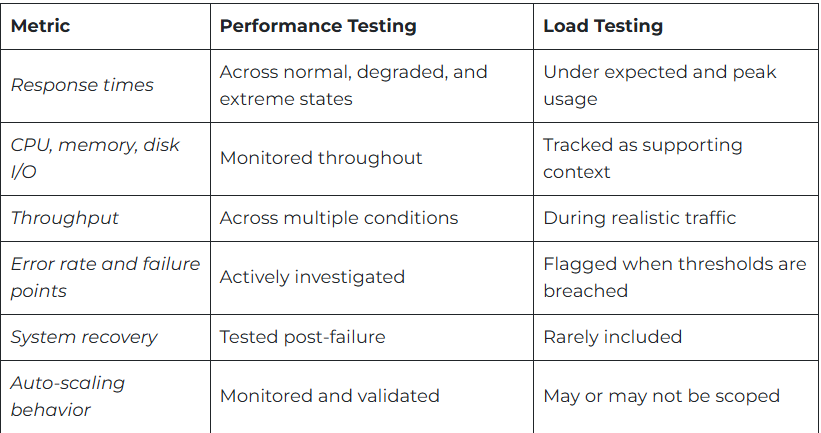
The metrics themselves may look familiar at first glance, but the interpretation and depth may differ:
When to Use What?: Performance Testing vs Load Testing
Knowing the difference between performance testing and load testing is useful. But knowing when to adopt each and how to combine them will set you apart. Let’s see how you can make informed release decisions.
Performance testing happens earlier in the SLDC, during architectural design, early builds, or major refactors.
For example, are you rolling out a microservices platform? Running performance tests helps identify service-level issues and latency spikes invisible during functional testing. This may involve gradually increasing load, changing test data, or simulating more complex user flows.
Load testing is usually run as a “go-live gate.” It’s when the app is built and functionally complete. Think of it as your checkpoint. It helps you answer the question, “Can we release this app with confidence?”
The goal is not to break the system but to prove it holds steady under pressure. For instance, you’re preparing for a high-profile campaign. Load testing lets you simulate surge traffic, monitor checkout flow stability, and validate that your infrastructure auto-scales as expected.
How Performance Testing vs Load Testing Complement Each Other in the SDLC
Let’s analyze their role closely through the following table:

Best Practices for Performance Testing vs Load Testing
Executing load and performance testing is rarely straightforward. Here are key practices to help you move from reactive testing to proactive app quality assurance:
1. Design for environment parity
Don’t rely on lower-tier environments to simulate production behavior. Create your test architecture with scalability in mind, or risk concluding flawed simulations. Use Infrastructure-as-Code (IaC) to mirror production topology and integrate third-party services, even in a sandbox environment.
2. Use realistic, messy data
While using synthetic data for testing purposes may be convenient, it doesn’t really work for running performance and load tests.
Performance testing based on idealized inputs results in blind spots in logic paths, API call patterns, and catching behavior. And when load tests rely on uniform request flows, they miss the concurrency dynamics that strain the app during production.
Therefore, capture request/response traces from production and use them to generate test scenarios that reflect actual behavior.
3. Define clear, business-aligned performance objectives
Performance testing is cross-functional and intersects with UX, infrastructure, business continuity, and product. Load testing is necessary to roll out the app with confidence. The results fail to provide meaningful information if the test goals aren’t aligned with business risk or operational expectations.
4. Establish and track baselines
You can’t spot a regression if you don’t know what “normal” looks like. Establish benchmarks early and revisit them after major code, infra, or config changes. For example, track performance trends over time, not just pass/fail results. Spikes and drifts are early signals.
Source: This blog was originally published at testgrid.io


Comments
Post a Comment